任务说明
无实物全虚拟仿真
手爪由PLC控制,PLC与机器人需要通信,实现机器人抓取手爪->抓取工件->放置->返回完成任务
主要工作
与真实项目的区别,PLC不支持Modbus仿真,需要通过数字孪生互转一下数据
- 配置机器人通信(上位机通信协议和Modbus协议)
- 配置PLC通信
- 通信数组配置
- 映射数据
手爪模型IO
| 输入 | 说明 | 输出 | 说明 | ||
|---|---|---|---|---|---|
| IN[0] | OUT[1] | 手爪开到位 | |||
| IN[1] | OUT[2] | 手爪关到位 | |||
| IN[2] | 手爪开关 | OUT[3] |
PLC模型IO
| 输入 | 说明 | 输出 | 说明 | ||
|---|---|---|---|---|---|
| IN[0] | 手爪开到位 | OUT[0] | 握爪开关 | ||
| IN[1] | 手爪关到位 | OUT[1] | |||
| IN[2] | OUT[2] | 手爪开关 |
机器人模型IO
| 输入 | 说明 | 输出 | 说明 | ||
|---|---|---|---|---|---|
| IN[0] | 握爪开关 | OUT[0] | |||
| IN[1] | OUT[1] | ||||
| IN[2] | OUT[2] |
IO映射表
| 映射端实体 | IO序号 | 接收端实体 | IO序号 | 说明 | API |
|---|---|---|---|---|---|
| Empty_14 | 0 | LBT_11 | 0 | PLC映射控制握爪开关 | glb_map_io(“Empty_14”,0,”LBT_11”,0); |
| Empty_14 | 2 | JIANDAOSHI_6 | 2 | PLC映射控制手爪开关 | glb_map_io(“Empty_14”,2,”JIANDAOSHI_6”,2); |
| JIANDAOSHI_6 | 0 | Empty_14 | 0 | 手爪开到位映射到PLC | glb_map_io(“JIANDAOSHI_6”,0,”Empty_14”,0); |
| JIANDAOSHI_6 | 1 | Empty_14 | 1 | 手爪关到位映射到PLC | glb_map_io(“JIANDAOSHI_6”,1,”Empty_14”,1); |
建立PLC程序、数据表块定义
数字孪生交互数据表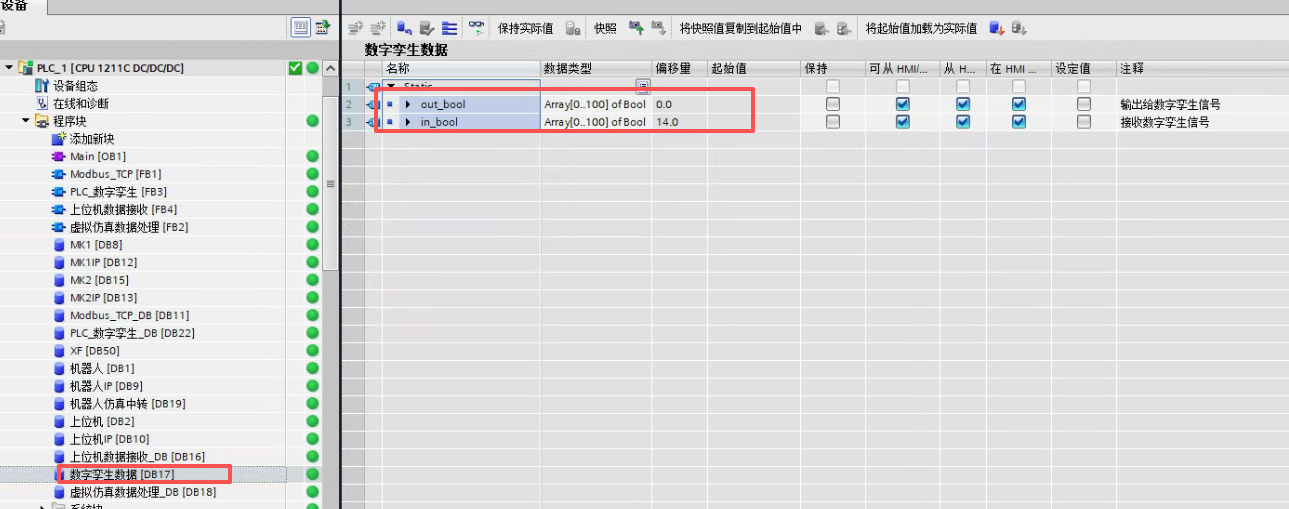
机器人Modbus中转数据表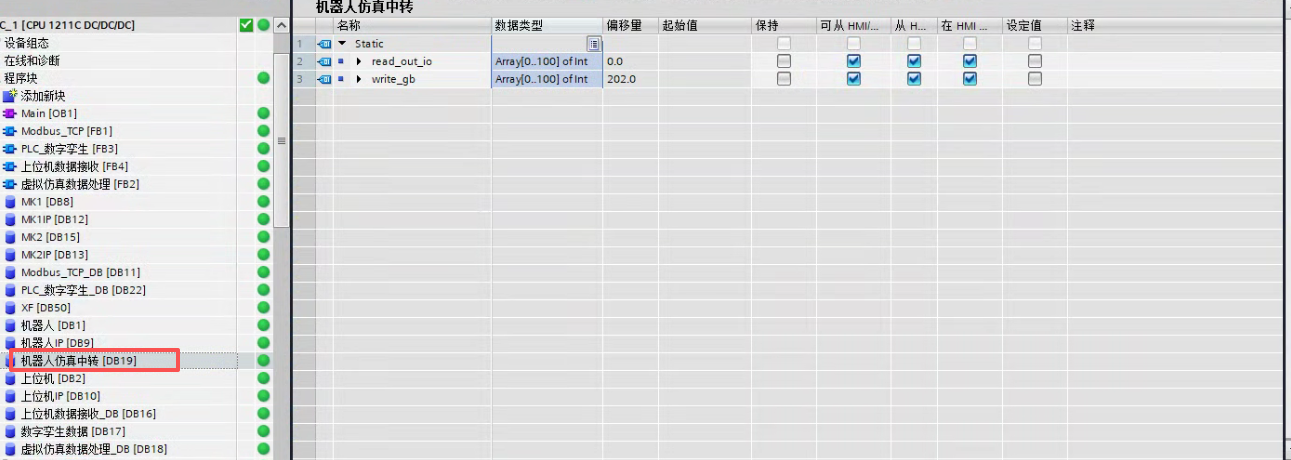
PLC中转控制程序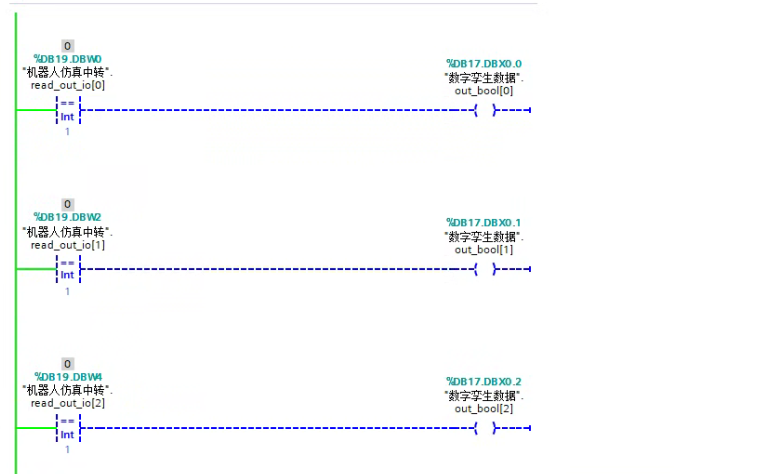
模型目录
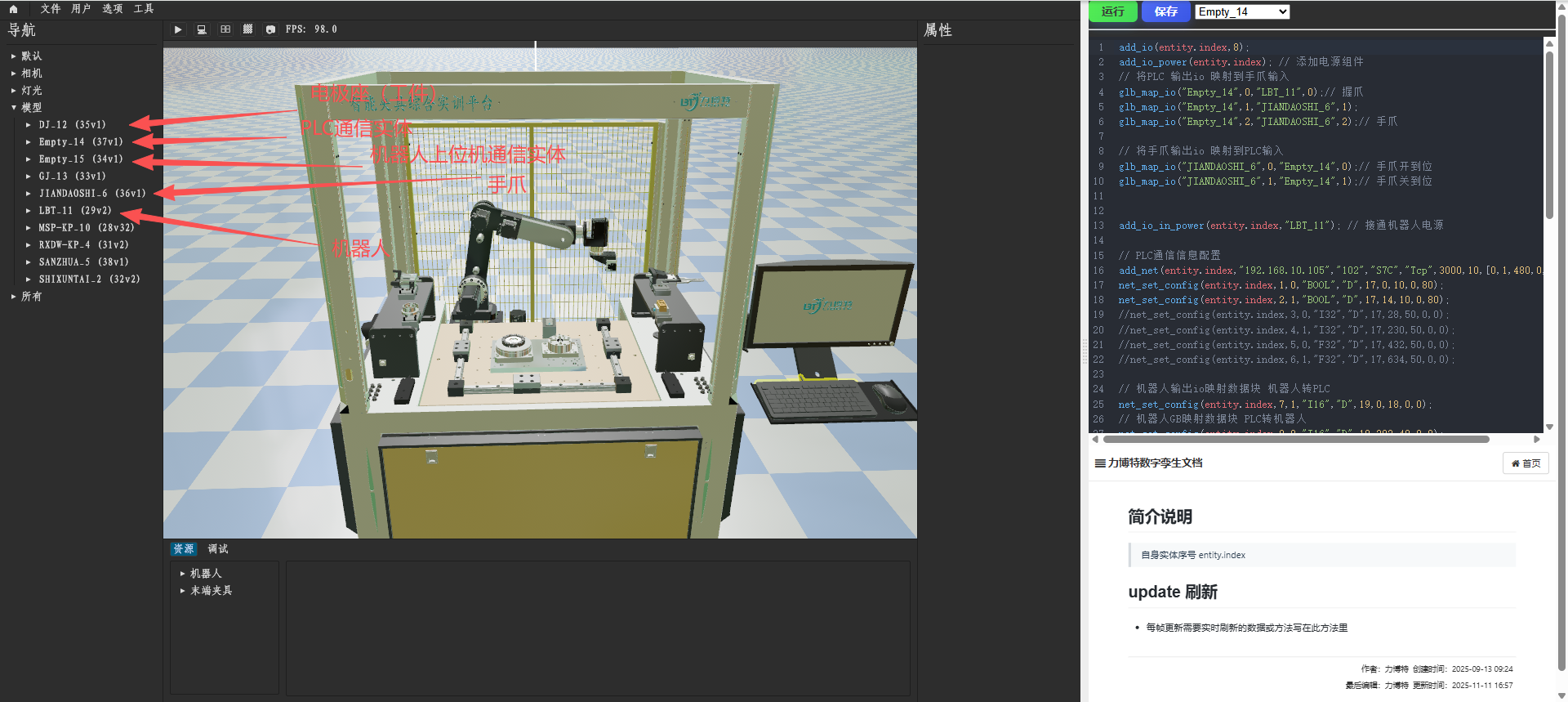
脚本配置
DJ_12: 工件的脚本
// 给当前实体,添加工件标记
add_work(entity.index);
Empty_14: PLC的脚本
add_io(entity.index,8);
add_io_power(entity.index); // 添加电源组件
// 将PLC 输出io 映射到手爪输入
glb_map_io("Empty_14",0,"LBT_11",0);// 握爪
glb_map_io("Empty_14",1,"JIANDAOSHI_6",1);
glb_map_io("Empty_14",2,"JIANDAOSHI_6",2);// 手爪

// 将手爪输出io 映射到PLC输入
glb_map_io("JIANDAOSHI_6",0,"Empty_14",0);// 手爪开到位
glb_map_io("JIANDAOSHI_6",1,"Empty_14",1);// 手爪关到位


add_io_in_power(entity.index,"LBT_11"); // 接通机器人电源

// PLC通信信息配置
add_net(entity.index,"192.168.10.105","102","S7C","Tcp",3000,10,[0,1,480,0,0],[]);
net_set_config(entity.index,1,0,"BOOL","D",17,0,10,0,80);
net_set_config(entity.index,2,1,"BOOL","D",17,14,10,0,80);
//net_set_config(entity.index,3,0,"I32","D",17,28,50,0,0);
//net_set_config(entity.index,4,1,"I32","D",17,230,50,0,0);
//net_set_config(entity.index,5,0,"F32","D",17,432,50,0,0);
//net_set_config(entity.index,6,1,"F32","D",17,634,50,0,0);

// 机器人输出io映射数据块 机器人转PLC
net_set_config(entity.index,7,1,"I16","D",19,0,18,0,0);
// 机器人GB映射数据块 PLC转机器人
net_set_config(entity.index,8,0,"I16","D",19,202,40,0,0);


fn update() {
  // 将LBT_11第2数组赋值给PLC第7数组
  net_set_value_maps(entity.index,7,"LBT_11",2,"I16",0);

  // 读取PLC DB17-0.0,写入io控制握爪
    net_read_bool(entity.index,1,0).then(|ok|{
        write_io(entity.index,1,0,ok);
    });

  // 读取PLC DB17-0.1,写入io控制预留
    net_read_bool(entity.index,1,1).then(|ok|{
        write_io(entity.index,1,1,ok);
    });

  // 读取PLC DB17-0.1,写入io控制手爪
    net_read_bool(entity.index,1,2).then(|ok|{
        write_io(entity.index,1,2,ok);
    });

  // 读取IO 写入到PLC 2号数组 地址0
  read_io(entity.index,0,0).then(|ok| {
    net_write_bool(entity.index,2,0,ok);
  });
   // 读取IO 写入到PLC 2号数组 地址1
  read_io(entity.index,0,1).then(|ok| {
    net_write_bool(entity.index,2,1,ok);
  });

}
Empty_15: 机器人上位机协议的脚本
//add_net(entity.index,"192.168.10.122","6000","NRCJSON","Tcp");
//add_net(entity.index,"192.168.10.122","6000","NRCJSON","Tcp",3000,3,[0,0,0,0,0],[]);
add_net(entity.index,"192.168.1.13","7000","NRCJSON","Tcp",3000,3,[0,0,0,0,0],[]);

//add_net(entity.index,"192.168.10.117","502","ModbusTcpC","Tcp");
let varstr = #"{"channel":1,"stop":0,"robot":1,"mode":0,"interval":20,"queryType":["realPosACS"],"typeCfg":{}}"#;
net_set_config(entity.index,1,0,"F32",varstr,38162,1200,50,0,10);
//net_set_config(entity.index,1,0,"F32","3",1,1200,10,0,0);
set_map_joint(entity.index,"LBT_11",1,1,0);
set_map_joint(entity.index,"LBT_11",2,1,1);
set_map_joint(entity.index,"LBT_11",3,1,2);
set_map_joint(entity.index,"LBT_11",4,1,3);
set_map_joint(entity.index,"LBT_11",5,1,4);
set_map_joint(entity.index,"LBT_11",6,1,5);
//set_map_joint(entity.index,"LBT_11",0,1,7);
JIANDAOSHI_6 :电极手爪的脚本
add_io(entity.index,8);
add_paw(entity.index); // 标记手爪组件

//add_ray(entity.index,"body1","R",0.125,"",-0.1,-0.01,0.030,true);
// add_io_power(entity.index); // 添加电源
// add_io_in_power(entity.index,"Empty_14");
//add_ray(entity.index,"body1","R",0.225,"",0.0,0.0,0.03,true);

// 状态记录
let state = #{
    get: 0,  // 抓取标记
    open: 0,  // 开关标记
    open_ray: 0  // 开关标记
};


fn update() {
    read_io(entity.index,0,2).then(|ok| {
        write_io(entity.index,1,0,ok);
              write_io(entity.index,1,1,!ok);
        if ok {
            add_ray(entity.index,"body1","R",1.225,"",0.1,0.03,0.03,true);

            //add_ray(entity.index,"body1","R",0.225,"",-0.15,0.015,0.03,true);
            state.open = 1;  // 开关标记
            state.open_ray = 1;  // 开关标记
            v_rz(entity.index,"body4",0.015,0.005);
            v_rz(entity.index,"body3",-0.015,-0.005);
            if state.open_ray == 1  {
              //add_ray(entity.index,"body1","R",0.225,"",-0.00,0.03,0.025,true);
            }
            if state.get==1 && state.open==1 {
              remove_ray(entity.index,"body1");
              // 放置
              put_work(entity.index,"body1").then(|ok1|{

              });
            }

        }else{
            remove_ray(entity.index,"body1");
            v_rz(entity.index,"body4",0.0,-0.005);
            v_rz(entity.index,"body3",0.0,0.005);
            state.open_ray=0;
            if state.get==0 && state.open==1 {

              // 抓取
              get_work(entity.index,"body1").then(|ok1|{
                state.open = 0;
                if ok1 {
                    state.get = 1; // 抓取标记
                }else{
                }
              });

            }else if state.get==1 && state.open==1 {
              // 放置
              put_work(entity.index,"body1").then(|ok1|{
                state.open = 0;
                state.get = 0; // 放置标记
              });

            }
        }
    });
}
LBT_11 : 机器人的脚本
add_io(entity.index,8);
add_io_power(entity.index); // 添加电源

glb_map_io("Box_5",1,"lbt_djsz_11",2);
glb_map_io("lbt_djsz_11",0,"Box_5",0);
glb_map_io("lbt_djsz_11",1,"Box_5",1);

// 将输入电源连接到PLC
add_io_in_power(entity.index,"Empty_14");

add_net(entity.index,"192.168.1.13","502","ModbusTcpC","Tcp",3000,10,[0,1,480,0,0],[]);
// 写入机器人GB、接收信号 ,PLC转机器人
net_set_config(entity.index,1,1,"I16","16",1,400,40,0,80);
// 读取机器人io、控制,机器人转到PLC
net_set_config(entity.index,2,0,"I16","3",1,800,18,0,80);

// 状态记录
let state = #{
    get_paw: 0,  // 手爪抓取
    paw_open: 0  // 开关标记
};

fn update() {
    // 将PLC第8数组赋值给LBT_11第1数组
  net_set_value_maps(entity.index,1,"Empty_14",8,"I16",0);

  // 读取IO 添加传感器 进行手爪取放
  read_io(entity.index,0,0).then(|ok| {
    if ok {
        add_ray(entity.index,"TOOL","R",1.51,"",0.0,0.0,0.0,true); //添加传感器
        state.paw_open = 1;  // 开关标记
        if state.get_paw==1 && state.paw_open==1 {
          remove_ray(entity.index,"TOOL");
          // 放置
          put_paw(entity.index,"TOOL").then(|ok1|{

          });
        }
    }else{
        remove_ray(entity.index,"TOOL"); // 删除传感器
        if state.get_paw==0 && state.paw_open==1 {
            // 抓取
            get_paw(entity.index,"TOOL").then(|ok1|{
                state.paw_open = 0;
                if ok1 {
                    state.get_paw = 1; // 抓取标记
                }else{
                }
            });
        }else if state.get_paw==1 && state.paw_open==1 {
            // 放置
            put_paw(entity.index,"TOOL").then(|ok1|{
              state.paw_open = 0;
              state.get_paw = 0; // 放置标记

            });
        }
    }
  });

}
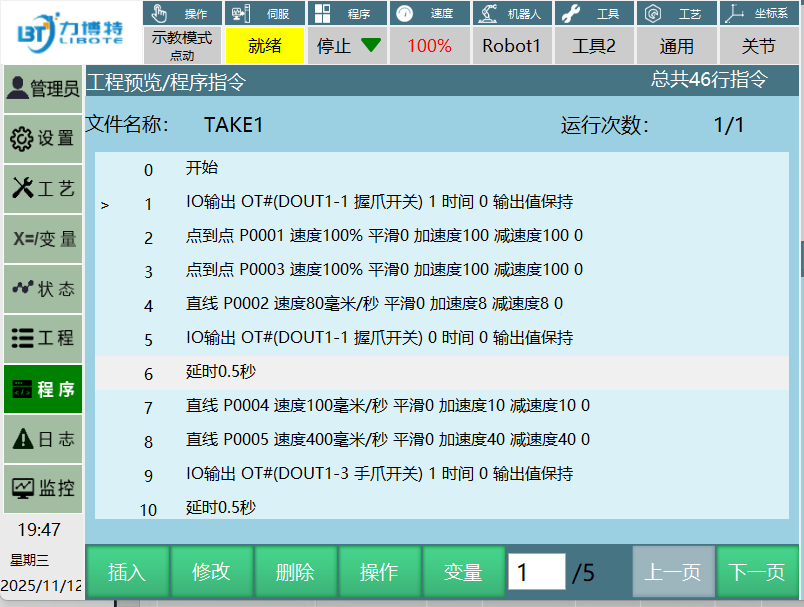
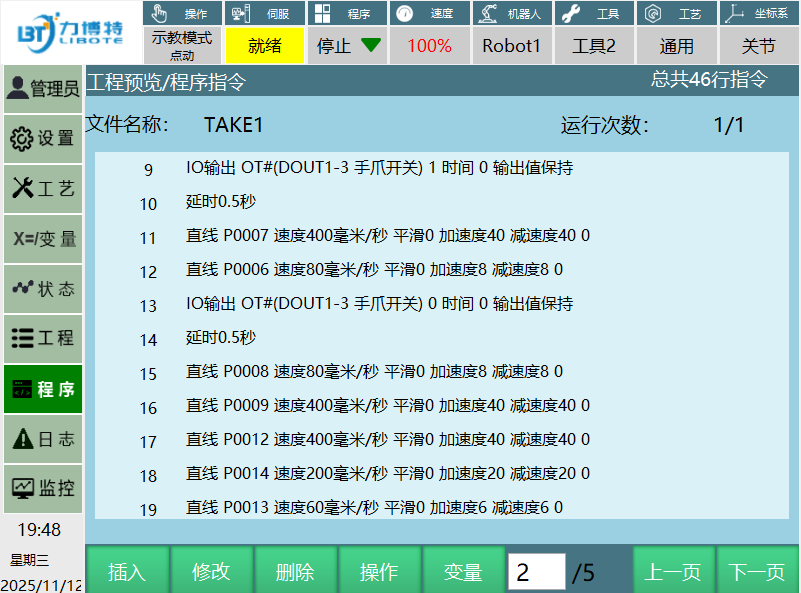
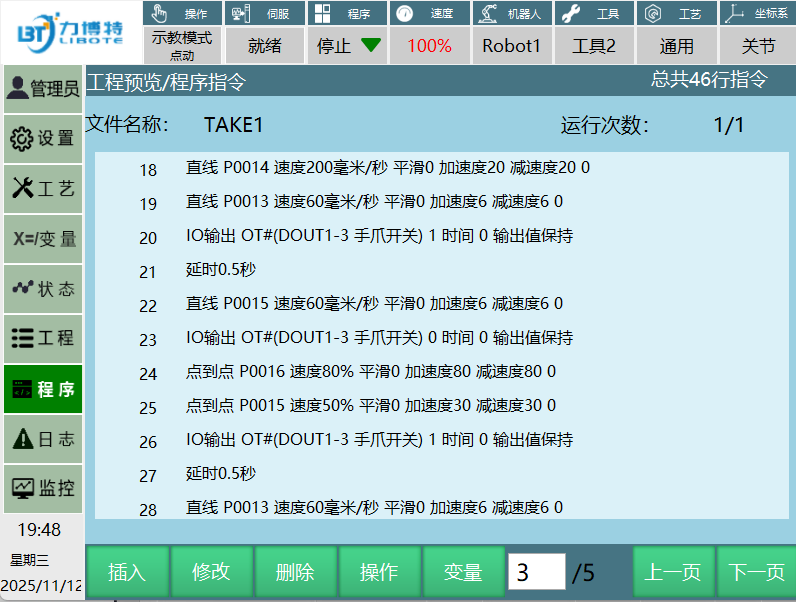
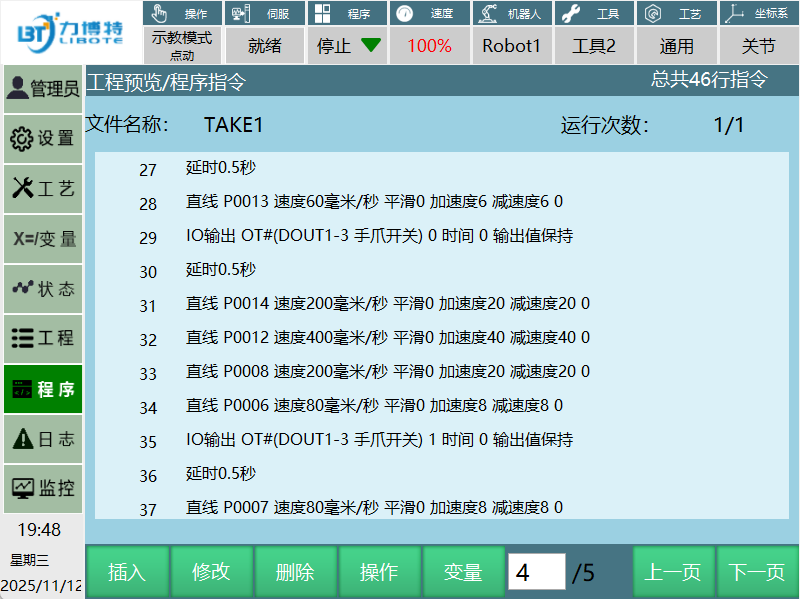
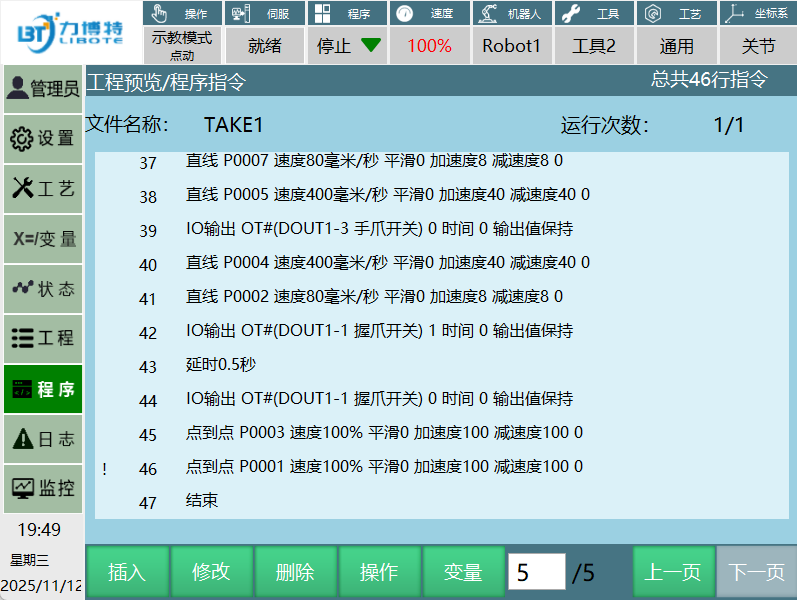
机器人程序
实现的效果
作者:力博特 创建时间:2025-11-11 19:11
最后编辑:力博特 更新时间:2026-01-14 08:17
最后编辑:力博特 更新时间:2026-01-14 08:17